.: Most Read :.
-
 Berapa ramai dah pernah rasa nasi ayam penyet? Mula-mula memang agak skeptikal sikit dengan ayam penyet... ingatkan macam mana la rupa dan ...
 -
 Hye akak2, abg2, adik2 yang nak cari tips cara hilangkan bau hanyir apabila masak makanan laut. Tips ni di inherit daripada my mum. S...
 -
 May 2 nd , 2016, marks the 4 th year of my servicing in UNITEN as a lecturer. There are up and down in my career. From there I learnt man...
 -
Posting kali ini bukan nak promote barang. Tapi nak share posting pasal pin tudung yang disiapkan dengan penuh kasih sayang (macam spongebo...
-
 8.20am phone is ringing Caller: "How are you doing?" bla.. bla... bla... "I want you to study about scientific LINUX...

Join Churp Churp

Click on the image to find out more
Showing posts with label Twitter on blog. Show all posts
Showing posts with label Twitter on blog. Show all posts
Friday, March 09, 2012

Sunday, February 27, 2011
Add Twitter on Blogger or Website
I have made a special add-on for my blog just to remember for this 100th post. I officially have made my first twitter account and put it on my blog. This allows me to interact directly with my beloved reader a.k.a 3ters. At the first place, I would like to add shoutbox on my blog. But I am afraid of spam or person that impersonate other people’s name or etc. When I browsing to other people’s blog, I saw this twitter box. I figured out the way to put it on the webpage – purpose of this posting. The steps are very simple and easy.
STEP 1: You must enable your tweets to the public. Change the setting on your account. http://twitter.com/settings/account

STEP 2: To get the widget, go to http://twitter.com/about/resources/widgets . You will get the following display.
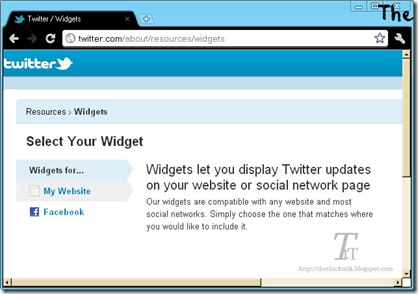
STEP 3: To get widgets for website or blog, choose My Website –> Profile Widget

STEP 4: You can customize you widget setting and layout. Include your username on the setting tab. You can also change the widget’s color via Appearance tab. Don’t forget to click on Test Settings button to get the preview of your widget. When you have finished, click Finish & Grab Code button.

STEP 5: For blogger, just click on the Blogger’s account.

It’s DONE! Now I have my Twitter profile on my blog.

I will feel so pleased if you would like to follow me here. @shakirah3ters

Subscribe to:
Comments (Atom)