.: Most Read :.
-
 Bahan-bahan: 2 ekor ketam dipotong 1 ulas bawang putih dihiris 1 ulas bawang merah dihiris 1 tangkai daun kari 1 sudu halba...
 -
Wah… tajuk nak gempak je. Actually tak tahu nak namakan style lilit ni style apa sebab nk kata syiria, xpakai anak tudung syiria. Nak kata s...
-
I did it last 2 hours. Tu pon setelah beberapa lama tak hug beliau. Seperti biasa, air mata ni pasti akan mengalir. We always mencari ibu ap...
-
 While browsing on Twitter this morning, I have found this advertisement from Lenovo. It is about their new Ultrabook. What attracts me at th...
 -
Setiap hari adalah hari untuk menghargai IBU dan bapa. Since everyone sibuk wishing hari ibu here and there, I dont want my mum to feel keti...


Join Churp Churp

Click on the image to find out more
Showing posts with label Twitter on blog. Show all posts
Showing posts with label Twitter on blog. Show all posts
Friday, March 09, 2012

Sunday, February 27, 2011
Add Twitter on Blogger or Website
I have made a special add-on for my blog just to remember for this 100th post. I officially have made my first twitter account and put it on my blog. This allows me to interact directly with my beloved reader a.k.a 3ters. At the first place, I would like to add shoutbox on my blog. But I am afraid of spam or person that impersonate other people’s name or etc. When I browsing to other people’s blog, I saw this twitter box. I figured out the way to put it on the webpage – purpose of this posting. The steps are very simple and easy.
STEP 1: You must enable your tweets to the public. Change the setting on your account. http://twitter.com/settings/account

STEP 2: To get the widget, go to http://twitter.com/about/resources/widgets . You will get the following display.
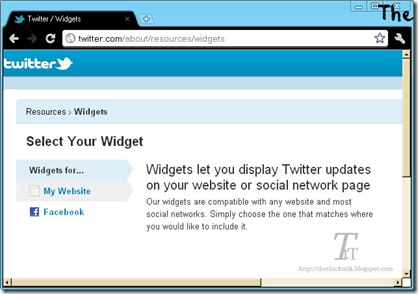
STEP 3: To get widgets for website or blog, choose My Website –> Profile Widget

STEP 4: You can customize you widget setting and layout. Include your username on the setting tab. You can also change the widget’s color via Appearance tab. Don’t forget to click on Test Settings button to get the preview of your widget. When you have finished, click Finish & Grab Code button.

STEP 5: For blogger, just click on the Blogger’s account.

It’s DONE! Now I have my Twitter profile on my blog.

I will feel so pleased if you would like to follow me here. @shakirah3ters

Subscribe to:
Posts (Atom)